
How to Use DMARC Reports to Improve Your Email Deliverability

Learn how to read and act on DMARC aggregate reports to identify authentication failures, find unauthorized senders, and improve your email deliverability.
DMARC Reports Are Your Deliverability Dashboard
Most companies set up DMARC and forget about it. That's a mistake.
Email authentication requires ongoing monitoring:
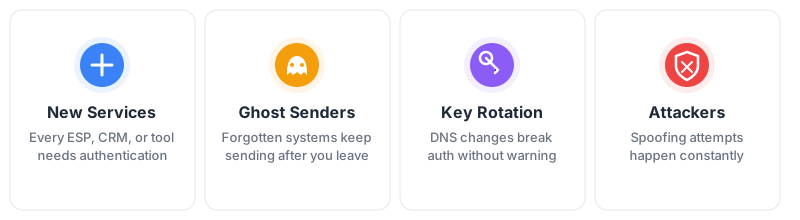
The stakes are your overall deliverability. Services like Gmail, Yahoo, and Microsoft use DMARC results to judge your sender reputation. Failures follow you.
DMARC reports are your early warning system.
What Reports Tell You
Every report shows who's sending email as your domain and whether they're authenticated.
| Data Point | What It Tells You |
|---|---|
| Source IP | Every server sending as your domain |
| Volume | How many emails from each source |
| SPF/DKIM results | Did authentication pass? |
| Alignment | Did it match your From: domain? |
| Disposition | Delivered, quarantined, or rejected? |
Don't parse XML yourself. Use a reporting service like Postmark DMARC, dmarcian, or Valimail. For details on report types, see RUA vs RUF Reports.
Three Scenarios You'll See
The goal is full authentication. The closer you are to 100% of your email being fully authenticated, the better your deliverability.
Fully authenticated — SPF passes, DKIM passes, alignment passes. This is where you want to be.
Partially authenticated — SPF or DKIM passes, but alignment fails. Usually an ESP signing with their domain instead of yours. Fix it.
Failing completely — Both SPF and DKIM fail. Either misconfigured or someone spoofing you. Investigate immediately.
5 Common Issues and Fixes
1. ESP Without Custom Authentication
Signs: High volume, SPF passes, DKIM alignment fails (shows sendgrid.net instead of your domain).
Fix: Enable domain authentication in your ESP settings. Add their DNS records. Every major ESP supports this.
2. Spoofing Attempts
Signs: Unknown IPs, both SPF and DKIM failing, often in bursts.
Fix: WHOIS the IP. If malicious, this is why you need p=reject. On p=none, these emails still deliver.
3. Forgotten Legacy Systems
Signs: Low volume from your infrastructure, both failing.
Fix: Find the source (old web server, dev environment, printer). Either configure authentication or shut it down.
4. Key Rotation Problems
Signs: Same IP showing failures one day, passes the next.
Fix: Keep old DKIM records active 48-72 hours during rotation. Verify DNS propagation before removing old keys.
5. Email Forwarding
Signs: Failures from Gmail, Yahoo, or corporate mail server IPs.
Fix: You can't prevent this. Don't count forwarding against your pass rate.
Pass Rates and Enforcement
Target: 95%+ pass rate
| Pass Rate | Status |
|---|---|
| 95-100% | Ready for enforcement |
| 80-95% | Investigate before enforcing |
| Below 80% | Significant problems |
The Path to Full Compliance
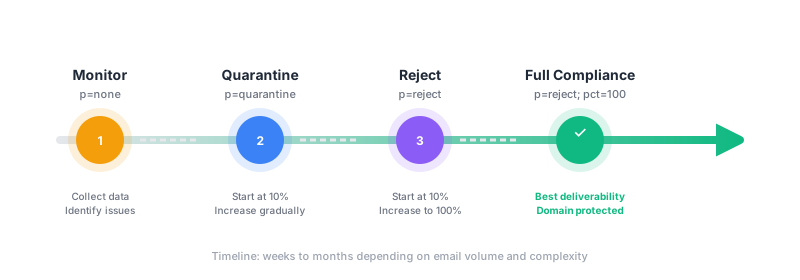
Move through each stage as your pass rate improves. Full compliance (p=reject at 100%) gives you the best deliverability and protects your domain from spoofing.
ISP Requirements
Major ISPs now require email authentication. Non-compliance means delivery problems.
Gmail & Yahoo (February 2024)
For senders of 5,000+ messages per day:
- SPF and DKIM authentication required
- DMARC policy required (minimum
p=none) - Spam complaint rate must stay below 0.3%
- One-click unsubscribe required for marketing email
- Valid forward and reverse DNS for sending IPs
What happens if you don't comply: Emails are rate-limited, deferred, or rejected outright. No warning—just delivery failures.
Microsoft Outlook (May 2025)
For high-volume senders to Outlook.com, Hotmail, and Live.com:
- SPF must pass and align with From: domain
- DKIM must pass and align with From: domain
- DMARC policy required (minimum
p=none) - Non-compliant mail goes to Junk or is rejected
What happens if you don't comply: Microsoft will initially route failing messages to Junk. Full rejection enforcement follows.
Why Reports Matter for Compliance
DMARC reports prove you're meeting these requirements:
- Pass rates show your authentication is working at scale
- Source identification confirms all your senders are properly configured
- Trend data demonstrates consistent compliance over time
- Failure details help you fix issues before ISPs take action
When deliverability problems occur, reports are your first diagnostic tool.
Check Your Setup
Make Sure Your Email Reaches the Inbox
Gmail, Yahoo, and Outlook check your DMARC record before they trust your mail. Confirm yours is set up to keep you out of spam and stop others from spoofing your domain.
Check My DMARC Record →Related: Email Authentication Setup Guide ・ DKIM and Deliverability