
DKIM and Email Deliverability: What Actually Happens When It Fails

Learn how DKIM impacts email deliverability, what happens when signatures fail, and how to troubleshoot alignment issues. Includes ISP-specific behavior and advanced forwarding scenarios.
Why DKIM Matters More Than You Think
When a receiving mail server processes your email, it doesn't just look at the content. It checks whether your message carries proof that it actually came from your domain.
That proof is DKIM—a cryptographic signature embedded in your email headers.
Here's what a receiving server sees:
Email without DKIM:
Authentication-Results: mx.google.com;
       dkim=none
       spf=pass
The server has no way to verify the message wasn't tampered with in transit. It can only trust that the sending IP is authorized (SPF). This email is more likely to land in spam.
Email with valid DKIM:
Authentication-Results: mx.google.com;
       dkim=pass header.d=yourcompany.com
       spf=pass
The server confirmed the message is exactly what yourcompany.com sent. This is a strong trust signal that boosts deliverability.
DKIM doesn't just prove authenticity—it builds domain-level reputation. Every email you send that passes DKIM contributes to how ISPs view your domain. A history of valid signatures tells Gmail, Outlook, and Yahoo that your domain is trustworthy.
The Key Point: SPF tells receivers who can send for you. DKIM proves the message actually came from you unchanged. Together with DMARC, they're the foundation of email deliverability.
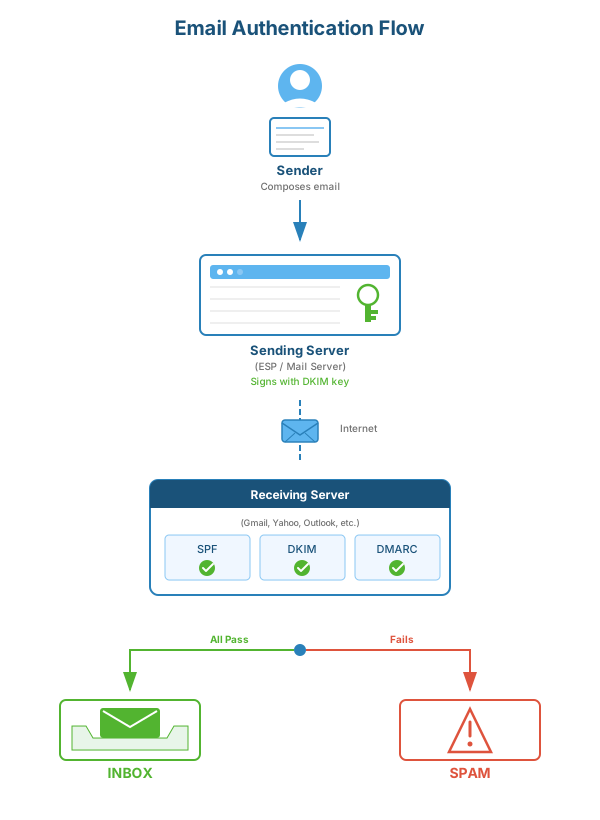
If you need help setting up DKIM for the first time, see our complete email authentication setup guide. This post focuses on what happens after setup—the deliverability impact.
How ISPs Use DKIM in Spam Filtering
DKIM isn't just a binary pass/fail check. Major ISPs use it as a reputation anchor that influences filtering decisions over time.
Gmail's Approach
Gmail weighs DKIM heavily in its filtering algorithm. When DKIM passes consistently:
- Your domain builds positive reputation
- Future emails benefit from that trust history
- You're less likely to trigger "suspicious content" flags
When DKIM fails or is missing, Gmail has less confidence in the message origin. The email gets scrutinized more heavily, and marginal content is more likely to land in spam.
Gmail also requires DKIM for its BIMI (Brand Indicators for Message Identification) feature—the logo that appears next to your emails in the inbox. No valid DKIM means no brand logo.
Yahoo and AOL
Yahoo's filtering system tracks sender reputation at the domain level, heavily weighted by DKIM authentication. Their postmaster documentation explicitly states that DKIM is "strongly recommended" and impacts filtering decisions.
Since Yahoo now requires authentication for bulk senders (as of February 2024), missing DKIM can result in outright rejection rather than just spam folder placement.
Microsoft Outlook/Hotmail
Microsoft uses DKIM as part of its SmartScreen filter and domain reputation system. While Microsoft doesn't publish specific weights, their filtering documentation confirms that valid DKIM signatures "help establish the reputation of the sender."
Microsoft is also more aggressive about rejecting emails that fail DKIM when the sending domain has a DMARC policy of p=reject.
The February 2024 Requirements
As of February 2024, Gmail and Yahoo require all bulk senders (5,000+ messages per day) to have:
- Valid SPF records
- Valid DKIM signatures
- A DMARC policy (at minimum
p=none)
Without DKIM, bulk senders face rejection or severe throttling. This isn't a soft recommendation—it's enforced at the protocol level.
Even if you send fewer than 5,000 emails daily, these requirements signal where the industry is heading. ISPs increasingly expect authentication as baseline hygiene.
Common DKIM Failures and Their Deliverability Impact
Not all DKIM failures are created equal. Different failure types produce different ISP responses.
Missing DKIM Record
What happens: Your DNS has no DKIM public key record, or it's misconfigured.
Authentication result:
dkim=neutral (no key for signature)
ISP response: The email lacks cryptographic verification. Most ISPs will: - Lower the email's trust score - Apply stricter content filtering - Route marginal emails to spam folder - For bulk senders post-Feb 2024: potentially reject outright
User experience: Emails that would normally reach the inbox may land in spam. Recipients don't see an error—the email just disappears into the spam folder.
Signature Mismatch
What happens: The DKIM signature doesn't match the public key, often due to key rotation issues or body modification.
Authentication result:
dkim=fail (signature didn't verify)
ISP response: This is worse than no signature at all. A failed signature suggests: - Message was tampered with in transit - Possible spoofing attempt - Misconfigured sending infrastructure
ISPs treat this as a red flag. Expect spam folder placement or rejection, even for previously trusted domains.
User experience: High bounce rates or complete delivery failure. Recipients may see bounced messages with authentication errors.
Expired or Rotated Keys
What happens: You've updated your DKIM private key but the DNS record still has the old public key.
Authentication result:
dkim=fail (key expired or revoked)
ISP response: Similar to signature mismatch—the email fails verification. ISPs can't distinguish between intentional key rotation and an attack.
User experience: Sudden delivery problems after key rotation. This often hits during maintenance windows and causes panic.
Body Hash Mismatch
What happens: The email content was modified after signing. This commonly occurs with: - Email forwarding services - Security gateways that add footers - Anti-spam scanners that modify headers
Authentication result:
dkim=fail (body hash did not verify)
ISP response: The signature was valid for a different message body. This looks suspicious and results in spam folder placement.
User experience: Emails work fine for direct recipients but fail for forwarded messages or when passing through security appliances.
DKIM Failure Impact Summary
| Failure Type | Severity | Typical ISP Response | User Impact |
|---|---|---|---|
| No DKIM record | Medium | Spam folder, stricter filtering | Lower inbox placement |
| Signature mismatch | High | Rejection or spam | Delivery failure, bounces |
| Expired/rotated key | High | Rejection or spam | Sudden delivery failure |
| Body hash mismatch | High | Spam folder | Forwarded emails fail |
| DNS timeout | Medium | Treated as no DKIM | Intermittent issues |
DKIM Alignment: The Hidden Deliverability Killer
DKIM passing isn't enough. The signing domain must also align with your From: address domain. This is where many senders unknowingly sabotage their deliverability.
What Is DKIM Alignment?
When you sign an email with DKIM, the signature includes a d= tag specifying the signing domain:
DKIM-Signature: v=1; a=rsa-sha256; d=yourcompany.com; s=selector1;
Alignment means this d= domain matches the domain in your From: header:
From: newsletters@yourcompany.com
In this example, d=yourcompany.com aligns with the From: address yourcompany.com. DMARC can pass.
When Alignment Breaks
Misaligned example:
From: newsletters@yourcompany.com
DKIM-Signature: d=sendgrid.net
DKIM technically passes—the signature is valid. But DMARC fails because SendGrid's domain (sendgrid.net) doesn't match your From: domain (yourcompany.com).
This happens when you use an ESP without configuring custom DKIM signing. The ESP signs with their domain, not yours.
Relaxed vs. Strict Alignment
DMARC lets you choose alignment strictness:
Relaxed alignment (adkim=r): The organizational domain must match.
- d=mail.yourcompany.com aligns with From: newsletters@yourcompany.com
- Both share the organizational domain yourcompany.com
Strict alignment (adkim=s): The exact domain must match.
- d=mail.yourcompany.com does NOT align with From: newsletters@yourcompany.com
- Only d=yourcompany.com would align
Most senders should use relaxed alignment—it's the default and handles subdomains sensibly.
Why Third-Party Senders Break Alignment
When you use a marketing platform, transactional email service, or CRM, they send on your behalf. Without custom domain authentication:
- Your ESP signs the email with their domain (
d=esp.com) - The From: address shows your domain (
from@yourcompany.com) - DKIM passes but alignment fails
- DMARC fails even though DKIM signature is valid
The fix: Configure custom DKIM in your ESP's domain authentication settings. This makes the ESP sign with your domain (d=yourcompany.com), achieving alignment.
Every major ESP supports this—it's usually called "domain authentication," "sender authentication," or "verified sending domain."
Alignment Impact
Misaligned DKIM is particularly dangerous because:
- DKIM technically passes (green checkmark)
- Everything looks fine in basic diagnostics
- But DMARC silently fails
- And your DMARC policy (quarantine/reject) gets enforced
Many senders don't discover alignment issues until they enable DMARC enforcement and their email stops being delivered.
DKIM and Email Forwarding
Email forwarding is DKIM's nemesis. Understanding why helps you troubleshoot delivery issues that aren't your fault.
Why Forwarding Breaks DKIM
When someone forwards your email, the forwarding server often:
- Modifies headers (adds forwarding info)
- Appends footers or disclaimers
- Rewrites the envelope sender
- Changes line endings or encoding
Any body modification invalidates the DKIM body hash. Any signed header modification invalidates those header signatures. The result:
dkim=fail (body hash did not verify)
Your email was perfectly valid when you sent it. The forwarding process broke it.
Common Forwarding Scenarios
Mailing lists: When your email goes to a Google Group or Mailman list, the list server typically adds a footer, modifies Subject: lines, or changes Reply-To headers. DKIM breaks.
Corporate email forwarding: Many companies auto-forward emails to personal addresses. If the corporate gateway modifies anything, DKIM fails when the email reaches Gmail.
Security appliances: Email security gateways that scan content, add banners, or rewrite URLs break DKIM signatures.
ARC: The Forwarding Solution
ARC (Authenticated Received Chain) was designed to solve forwarding. It works like this:
- Forwarding server verifies original DKIM signature
- Forwarding server creates an ARC seal preserving that result
- Receiving server sees the ARC chain and trusts the original authentication
The catch: Both the forwarding server and receiving server must support ARC. Major ISPs (Gmail, Microsoft, Yahoo) now support ARC, but adoption isn't universal.
As a sender, you can't directly implement ARC—it's handled by intermediate servers. But you should know:
- ARC is why some forwarded emails still work despite broken DKIM
- If forwarded emails fail delivery, ARC may not be in place along the path
- There's nothing you can configure to fix this; it depends on the forwarding infrastructure
Practical Workarounds
When forwarding consistently breaks your email:
- Direct recipients first: Focus on direct subscribers rather than forwarded addresses
- Re-subscribe forwards: Ask forwarding recipients to subscribe with their actual address
- Plain text option: Plain text emails are less likely to be modified by security appliances
- Contact IT: For B2B emails, the recipient's IT team can whitelist your domain
DKIM with Multiple Sending Services
Most companies don't send all email from one system. You might have:
- Google Workspace for employee email
- SendGrid for transactional emails
- Mailchimp for marketing newsletters
- Zendesk for support replies
Each needs its own DKIM configuration. Here's how to manage it.
Selector Strategy
DKIM selectors let you have multiple keys for one domain. Each service gets its own selector:
google._domainkey.yourcompany.com → Google Workspace key
s1._domainkey.yourcompany.com → SendGrid key
k1._domainkey.yourcompany.com → Mailchimp key
This is the standard approach and works well. Just ensure each ESP is configured to sign with its designated selector.
Avoiding Common Multi-Service Problems
Problem: Forgotten service still sending
You switched from Mailgun to SendGrid but never updated DKIM. Mailgun's selector still exists in DNS but the key is invalid or Mailgun is no longer signing.
Solution: Audit your DNS annually. Remove DKIM records for services you no longer use.
Problem: Subdomain confusion
Marketing uses campaigns.yourcompany.com, transactional uses notifications.yourcompany.com, and neither has DKIM configured.
Solution: Each subdomain needs its own DKIM records. SPF and DMARC inheritance varies, but DKIM never inherits.
Transactional vs. Marketing Domain Strategy
Some organizations separate transactional and marketing email entirely:
yourcompany.com- Business email and critical transactionalmail.yourcompany.com- Marketing newslettersnotifications.yourcompany.com- Automated transactional
Benefits: - Marketing reputation issues don't affect transactional delivery - Easier to monitor authentication per use case - Can use different DMARC policies per subdomain
Complexity: - More DNS records to manage - Each subdomain needs full SPF/DKIM/DMARC setup - Recipients see different "from" addresses
For most small-to-medium senders, a single domain with proper selector management is sufficient. Subdomain separation makes sense at scale or when marketing sends high-risk campaigns.
Debugging DKIM Deliverability Issues
When deliverability drops, here's how to determine if DKIM is the culprit.
Step 1: Check Email Headers
Every email contains authentication results. In Gmail, open an email and click "Show original" to see raw headers.
Look for the Authentication-Results header:
Authentication-Results: mx.google.com;
       dkim=pass header.i=@yourcompany.com header.s=google header.b=abc123;
       spf=pass (google.com: domain of sender@yourcompany.com designates 192.0.2.1 as permitted sender);
       dmarc=pass (p=REJECT sp=REJECT dis=NONE) header.from=yourcompany.com
What to check:
- dkim=pass - Signature verified
- header.d=yourcompany.com - Signing domain (check for alignment)
- header.s=google - Selector used
If you see dkim=fail, the header usually includes a reason:
- (no key for signature) - DNS record missing
- (signature didn't verify) - Key mismatch
- (body hash did not verify) - Content modified
Step 2: Verify DNS Records
Use DNS lookup tools to confirm your DKIM record is published and correct.
Using dig:
bash
dig TXT selector._domainkey.yourcompany.com
Using our DKIM verification tool: Check your DKIM record
What to check:
- Record exists at the correct selector
- v=DKIM1 version tag present
- p= contains the public key (or p= is empty for revoked keys)
- No syntax errors or truncation
Step 3: Send a Test Email
DNS looks fine but emails still fail? Send a test through the actual infrastructure.
Quick test: Send an email from your system to your personal Gmail, then check headers.
Comprehensive test: Use our live DKIM verification to send to a test address and see exactly what receiving servers see.
This catches issues that DNS checks miss: - ESP not actually signing emails - Wrong selector in use - Body modifications before signing
Step 4: Check DMARC Reports
If you have DMARC reporting enabled, aggregate reports show authentication results across all your email.
Look for patterns: - Specific source IPs with high DKIM failure rates - Particular domains showing alignment failures - Increasing failure rates over time (may indicate key expiration)
Troubleshooting Flowchart
Check headers → Is
dkim=passordkim=fail?- If fail, note the reason and continue
Check DNS → Does the DKIM record exist?
- If missing, add it in your ESP's domain settings
Check ESP settings → Is DKIM signing enabled?
- Most ESPs require explicit domain verification
Check alignment → Does
d=match From: domain?- If misaligned, configure custom DKIM in your ESP
Check for modification → Is something changing the email body?
- Security appliances, footers, tracking pixels can cause body hash failures
DKIM Best Practices for Maximum Deliverability
Use 2048-Bit Keys
1024-bit keys are considered weak and some ISPs flag them. Most ESPs now default to 2048-bit, but verify your configuration.
Note: 2048-bit keys may be too long for a single DNS TXT record on some providers. If you hit length limits, your provider may need to split the record or you can use CNAME-based DKIM.
Rotate Keys Annually
Key rotation limits exposure if a key is compromised. Schedule annual rotation:
- Generate new key pair
- Add new DKIM record with new selector
- Update ESP to sign with new selector
- Wait 48 hours for DNS propagation
- Verify new signatures are working
- Remove old DKIM record
Warning: Don't remove the old key until all in-transit emails are delivered. Emails signed with the old key need the old public key to verify.
Monitor Before Enforcing DMARC
Don't enable DMARC p=quarantine or p=reject until you've monitored authentication results:
- Start with
p=noneand aggregate reporting enabled - Monitor reports for 2-4 weeks
- Identify and fix any DKIM failures
- Only then move to enforcement
Jumping straight to p=reject with broken DKIM means rejecting your own legitimate email.
Keep DNS TTLs Reasonable
Use 1-hour (3600 seconds) TTL for DKIM records. This balances: - Performance (not too many lookups) - Flexibility (changes propagate in reasonable time)
Very long TTLs (24+ hours) make key rotation painful. Very short TTLs (under 5 minutes) may cause rate limiting.
Document Your Configuration
Maintain a record of: - All selectors in use and which service uses each - Key rotation dates - DNS provider access (for emergencies)
When deliverability problems hit, you don't want to be guessing which selector goes with which ESP.
Test Your DKIM Setup Now
DNS-based DKIM checkers tell you if your record exists. But they can't tell you if your emails are actually being signed correctly.
The only way to truly verify DKIM is to send an email and examine what receivers get.
Our live DKIM verification tool does exactly this:
- Send an email to our test address
- We receive it and analyze the actual DKIM signature
- You get a complete report showing:
- Whether DKIM passed or failed
- The signing domain and selector used
- Alignment status with your From: domain
- Any issues that would affect deliverability
Is Your Mail Landing in the Inbox?
Send one test email and see exactly what Gmail, Yahoo, and Outlook check when your message arrives — often the difference between the inbox and the spam folder.
Send a Test Email →Unlike DNS-only checkers, this catches: - ESPs that aren't actually signing emails - Misconfigured selectors - Body modifications breaking signatures - Alignment issues between signing domain and From: address
DKIM Deliverability Audit Checklist
Use this checklist to audit your DKIM configuration for maximum deliverability:
DNS Configuration
ESP Configuration
Alignment
Verification
Maintenance
Monitoring
The Bottom Line
DKIM is the cryptographic backbone of email deliverability. It's not enough to simply "have DKIM"—you need valid signatures, proper alignment, and ongoing monitoring.
Key takeaways:
DKIM builds domain reputation. Consistent passing signatures tell ISPs your domain is trustworthy.
Failures hurt more than missing signatures. A failed DKIM check looks like tampering or spoofing. No signature is better than a broken one.
Alignment is required for DMARC. Your ESP must sign with your domain, not theirs. Configure custom domain authentication.
Forwarding isn't your fault. When forwarding breaks DKIM, the issue is downstream infrastructure. Focus on direct recipients.
Test with real emails. DNS checks aren't enough. Send test emails through your actual infrastructure and verify the signatures.
Authentication protects your deliverability, your brand, and your recipients. DKIM is the foundation—make sure it's solid.
Ready to set up DKIM from scratch? See our complete email authentication guide for step-by-step SPF, DKIM, and DMARC configuration instructions.
Want to check your DKIM record? Use our DKIM DNS checker for instant DNS record verification.
Need to verify actual email signatures? Our live DKIM verification tool sends a real test email to show you exactly what ISPs see.